





DNS, or simply Domain Name System, is like the phonebook of the internet. When you type a URL like google.com or gadgetbytenepal.com, the DNS translates it into the IP address so that your computer will know where to go. What I mean by that is google.com has its own unique IP address, 172.217.10.46. DNS makes it easier for us to get to the website without remembering those big numbers.
|
On this page: |
|---|
Why Does Changing DNS Matter?
The use of DNS is not just for finding the correct website. It has other uses as well, like affecting the speed, reliability, and security when browsing through the internet.
What it means is that some DNS servers will respond faster than others, making your website load faster. Not only that, but if one of the DNS servers is down, you can just switch to another, keeping your connection stable. And more importantly, some DNS even filter malicious sites or prevent tracking, which protects your device.
Some of the most well-known DNS servers due to their reliability, fast nature, and security focus are Cloudflare DNS (1.1.1.1 / 1.0.0.1), Google’s Public DNS (8.8.8.8 / 8.8.4.4), and OpenDNS (208.67.222.222 / 208.67.220.220).
IMPORTANT: Changing DNS does not bypass government restrictions. It only improves how your device finds websites and connects to them.
Finally, how to change DNS?
For this part we will be using Cloudflare DNS, as it is focused primarily on speed and privacy. Cloudflare claim that they never log your browsing data. Not only that, it is used by a wide range of people and organizations around.
For Android Users
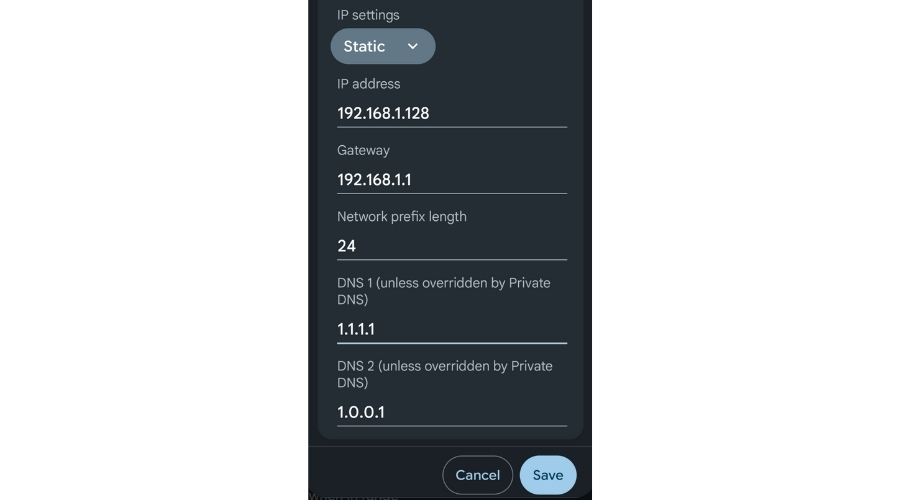
Step 1: Open the Settings app and go to Network & Internet.
Step 2: Select your current Wi-Fi network and tap the ‘gear’ icon.
Step 3: Scroll down to IP settings and change it from DHCP to Static.
Step 4: In the DNS 1 field, enter 1.1.1.1.
Step 5: In the DNS 2 field, enter 1.0.0.1.
Step 6: Tap Save to apply the changes.
| Note: Sometimes you cannot save the settings. This is because it requires you to enter your IP address. Simply type the IP address that you see in the box and save. |
|---|
For iPhone users.
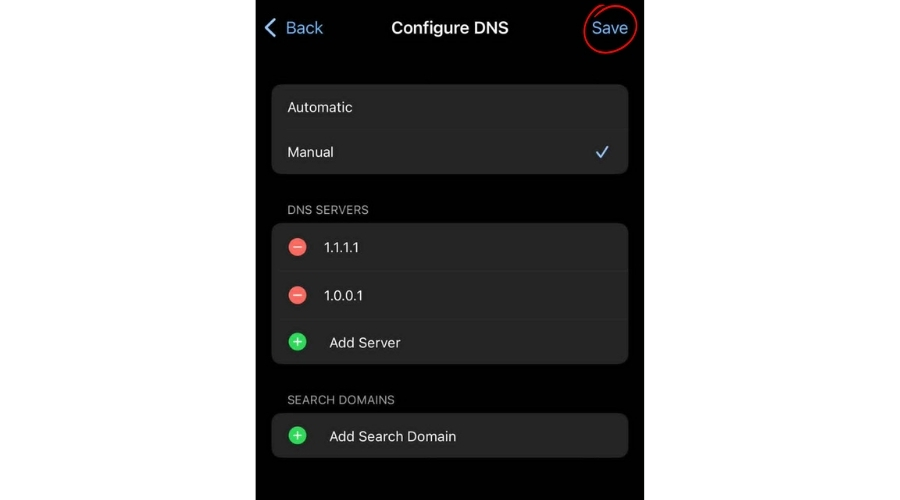
Step 1: Open the Settings app.
Step 2: Go to Wi-Fi, select your connected network, and tap Configure DNS.
Step 3: Then, choose Manual and remove any existing DNS entries.
Step 4: Add the following DNS addresses:
- 1.1.1.1
- 1.0.0.1
Step 5: Tap Save to apply the changes.
For Windows PC Users
PC users may find this process a bit longer, but it’s simple if you follow these steps:
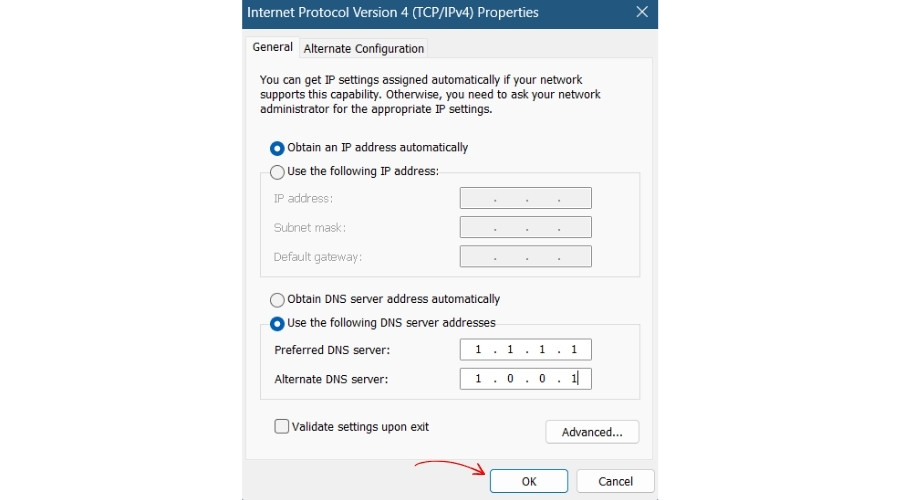
Step 1: Open the Control Panel.
Step 2: Go to Network and Internet, then click View network status and tasks.
Step 3: Find your active Wi-Fi (or Ethernet) connection and click on its name.
Step 4: In the pop-up window, select Properties.
Step 5: After that, scroll down and double-click on Internet Protocol Version 4 (TCP/IPv4).
Step 6: Select Use the following DNS server addresses.
Step 7: Enter the following values:
- Preferred DNS server: 1.1.1.1
- Alternate DNS server: 1.0.0.1
Step 8: Click OK to save the settings.
Additional Method
You can also use third-party apps from the Play Store or App Store that allow you to change the DNS server. The process is also quite simple: just download any of your preferred apps and add the ‘1.1.1.1’ and ‘1.0.0.1’ DNS servers.
Moreover, you can also use VPN software to change to a different location for privacy, security, and secure connections.